
File Management
A complete file upload and management system. Direct-to-bucket uploads, PDF extraction, file sharing across teams, and a full dashboard — not a bolted-on afterthought.

The file dashboard at /files — search, filter, share, and manage all uploaded files.
Direct-to-bucket uploads
Files upload directly from the browser to Railway bucket storage via presigned POST. No file bytes are proxied through your app server.
- Presigned POST requests generated server-side
- Browser uploads directly to S3-compatible storage
- Metadata tracked in PostgreSQL after upload
- CORS configuration documented for Railway buckets
PDF extraction via Mistral OCR
PDF files are automatically processed using Mistral OCR with markdown normalization. The same parser handles chat uploads and connector-fetched files from Drive and OneDrive.
- Mistral OCR extracts text with structural markdown
- Shared parser for uploads, Drive files, and OneDrive files
- Handles Office formats (DOC, DOCX, XLSX, PPTX) and plain text
- Extracted content made available to the AI during conversations
File sharing
Share uploaded files with your organization or specific teams. Shared files can be attached to messages by any team member.
- Share with entire organization or specific teams
- Shared files appear in a dedicated 'Shared with Me' section
- Unshare action available to the file owner
- Shared files can be attached to chat messages
Tabbed file dashboard
A full file management dashboard with three tabs: My Files, Org Files, and Team Files. Includes search, filters, pagination, and bulk actions.
- My Files tab always available; Org/Team tabs appear in org context
- Search by name (debounced), filter by type, filter by date (today/7d/30d)
- Sort by newest, oldest, name, or size
- Actions: share, rename, delete single, delete all with confirmations
- File type icons for images, PDF, Word, Excel, PowerPoint, CSV, TXT, Markdown
Reusable file picker in chat
Users can attach previously uploaded files to any message without re-uploading. A picker dialog shows My Files and Shared with Me tabs.
- Two attachment modes: upload new or reuse existing
- Picker shows My Files and Shared with Me tabs
- Up to 10 file attachments per message
- Presigned GET URLs generated for file previews
Three ways to attach files
Drag and drop files directly onto the chat input, use the upload button, or type @ to tag previously uploaded files by name — the same way you'd mention a file in any modern tool.
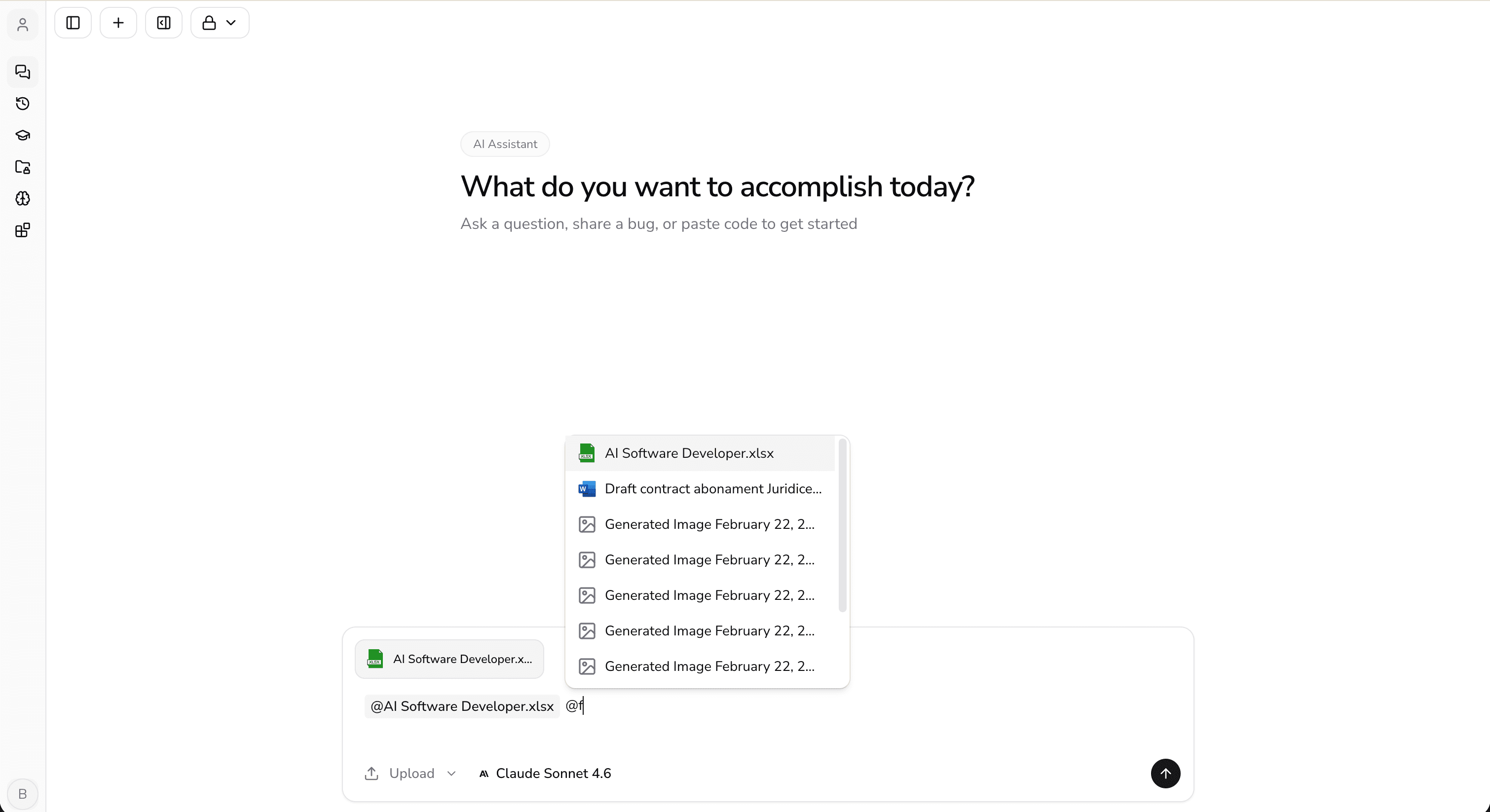
Type @ in the chat input to tag and attach previously uploaded files without re-uploading.
Security
Credentials never exposed client-side. Server-enforced MIME type validation, file size limits, and presigned URLs for all access.
- Bucket credentials stay server-side only
- MIME type and size validation enforced on the server
- Presigned URLs with expiration for downloads and previews
- 14 MIME types validated against at the chat API level
Supported file types
10 MB max per file. Up to 10 concurrent uploads and 10 attachments per message.
File management, built in from day one.
No hacked-together file flow — it's already part of the product.


